Core Concepts
ExSO is a robust framework that aimed at enhancing data-transparency for the greek power market and system operation. The core functionalities include:
Capability to build and maintain a local (csv-based) database for the greek system (“update” mode)
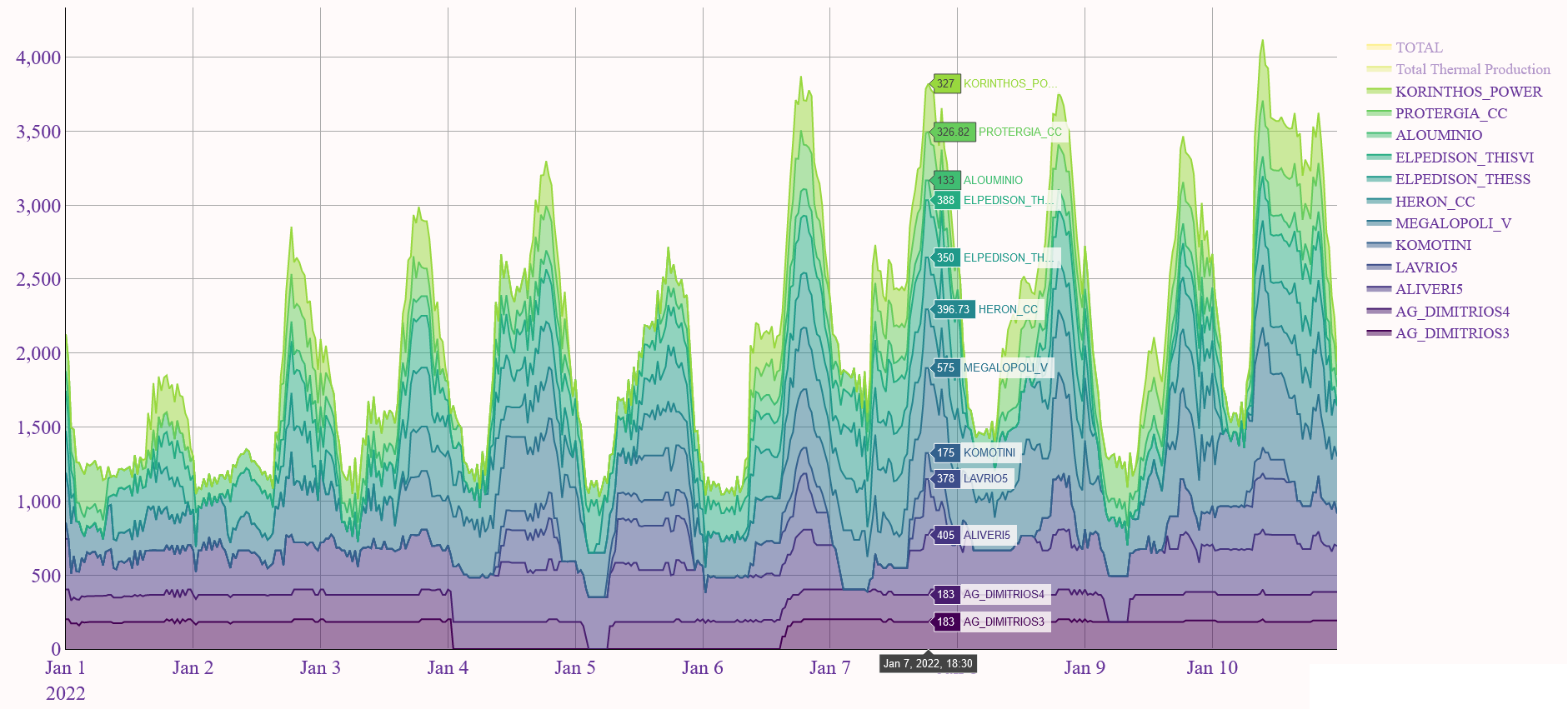
Access, combine, transform, visualize, extract data from the database (“query” mode)
There are three potentially complementary ways of using ExSO:
Through ExSO.xlsm
Through an IDE
Through the command line
This section summarizes the core concepts of exso, relevant for all three interaction apis
Report
A report (or report type) is a category of files, for a specific system or market operation.
For each report type, report files are published on a corresponding frequency (daily, weekly, annually, ad-hoc)
- Report Files may be excel or text files containing data for the specific report type, for a specific time period
In case of excel files, they may contain several Sheets.
Publisher
Publishers are the entities that publish the Reports. They may include AMIDE (IPTO), HEnEx, ENTSO-e, DESFA, etc.
Datalake
The datalake is a local directory created by exso, containing all report files as downloaded from the publishers
The general structure is:
The general structure of each Report File is:
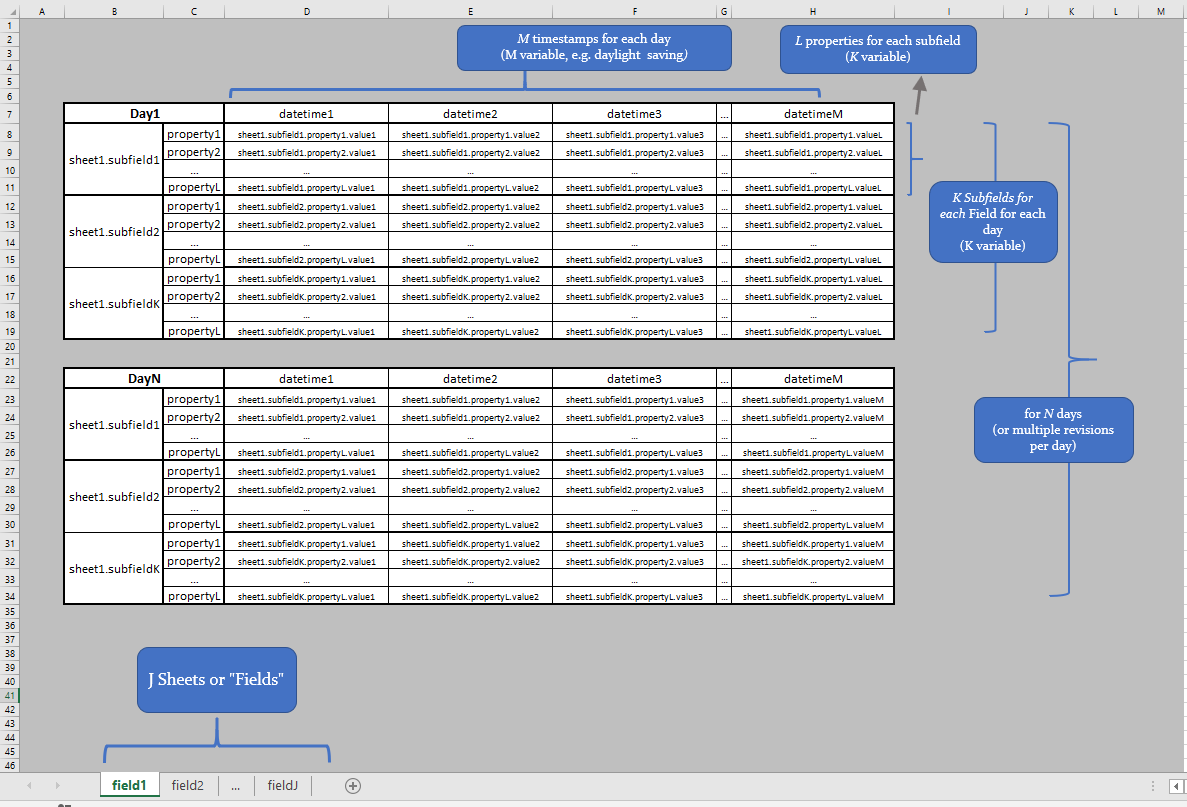
The datalake consists of raw excel (.xls, or .xlsx, or .zip of .xls*) reports, as published by the publishing parties.
Each report is published (is available) over a specific date range (some reports may be no longer actively updated but still useful for historical analysis)
Each report is published on a specific frequency (e.g. each day, each week, each month, etc.)
Each report file content, spans over various horizons (e.g. one day-long, one week-long, one month-long, etc.)
Each report file consists of one or more excel sheets
Each report is expressed in a specific timezone (EET, UTC or CET) and may or may not have well-defined daylight-saving switches.
Database
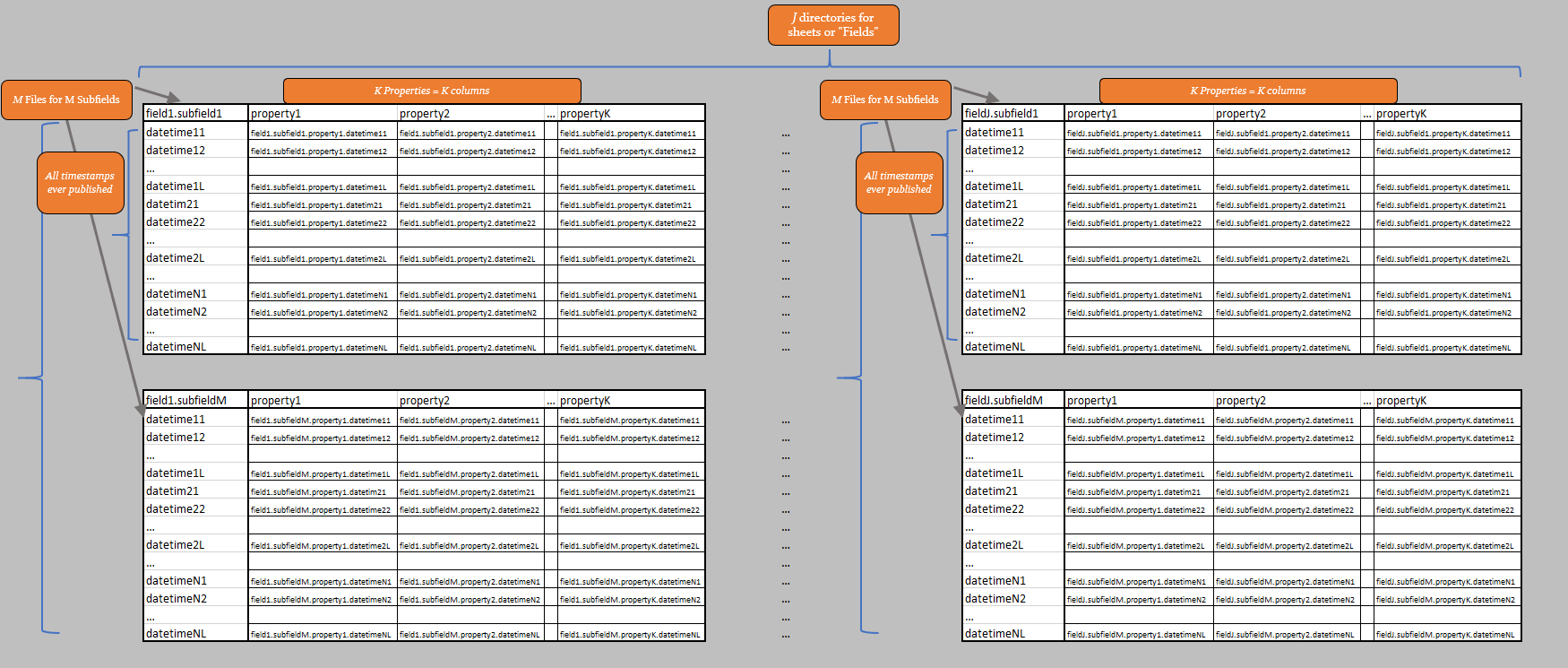
The database is a local directory created by exso, containing a high-quality, continuous version of the raw report files
The general structure is:
Nodes
Every object of the database is handled by exso as a Node object. So, the whole database is a Node, but a column of a file of a field of a report of a publisher is also a Node!
Nodes have some useful attributes that can be further invetigated in the Python API, but two key concepts are the .kind and .dna attributes:
.kind:- Can be: ‘root’, ‘publisher’, ‘report’, ‘field’, ‘file’, ‘property’
‘root’: represents the root database directory
‘publisher’: represents the root directory of a specific publishing entity
‘report’: represents the directory where all historical data are stored for this report type
‘field’: represents a directory inside the report directory, containing all data of a specific excel-sheet of the original report category
‘file’: represents all data of a specific subfield, of a specific field of a specific report
‘property’: represents a column of a specific file, and so on
.dna: A string that uniquely represents a node through its hierarchy in the database (e.g. for a ‘report’-kind Node, it will be: root.<publisher>.<report>)
Locators
Node Locators are unique Node identifications. Nodes can be uniquely accessed in more than one ways. The three main node locator types are: * DNA locators * Path locators * Successive children locators
In all three cases, nodes are accessed through a succession chain:
root > publisher > reportName > fieldName > fileName [>columnName]
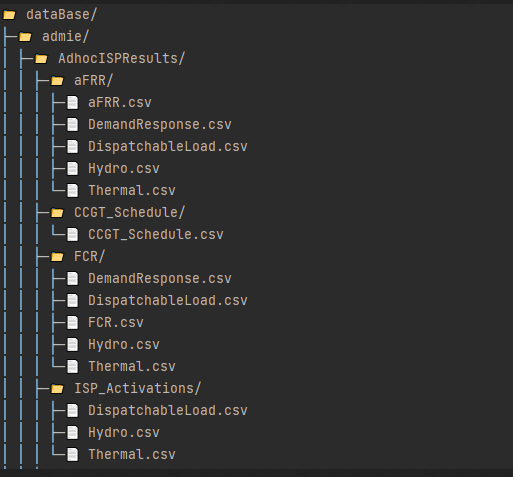
For better demonstration, we’ll use the example of ISP Activations/Redispatch, of a non-schedulued ISP or Integreated Scheduling Process, published by IPTO (report_name = “AdhocISPResults”), only for Hydroelectric Units.
The file is called “Hydro.csv” and is located in the directory “root/admie/AdhocISPResults/ISP_Activations”. All three methods below will return the desired Node object.
- DNA Locator
"root.admie.adhocispresults.isp_activations.hydro" # lower/upper case unimportant
- Path Locator
"C:path_to_root_databaseadmieAdhocISPResultsISP_ActivationsHydro.csv" # exact path must be provided
- Successive children locators
['root']['admie']['AdhocISPResults']['ISP_Activations']['Hydro'] # case sensitive: it accesses the names of the children of each successive node access
- As of exso v1.0.0, there is also an option for shortcut-locators, if the report’s nature allows it:
If a file name is unique in the whole database, you can directly access it, without specifying the whole chain:
tree['unique_file_name']
If a report has only a single file, you can access it quicker through the “fast forward” operator (“>>”):
tree['dam_results.>>']